> For the complete documentation index, see [llms.txt](https://callgraph.gitbook.io/callgraph-docs/llms.txt). Markdown versions of documentation pages are available by appending `.md` to page URLs; this page is available as [Markdown](https://callgraph.gitbook.io/callgraph-docs/account/access-and-fees.md).
# Access and fees
Understand My Access, GRAPH holder verification, subscription access and copy-trading fees.
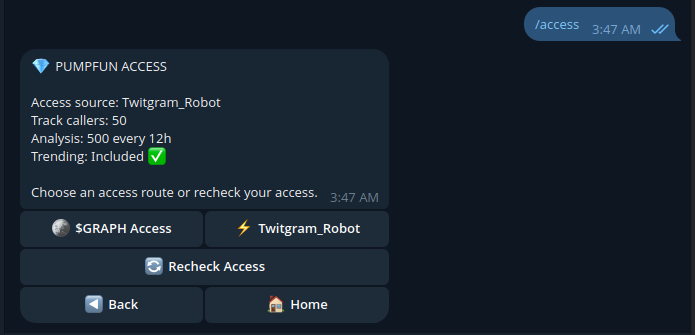
Open **My Access** to see your plan, tracked-caller limit, Analysis usage and available features.
Your allowance appears in My Access. Limits depend on your access level.
## Unlock access with $GRAPH
$GRAPH is live on **pump.fun** on **Solana**. The official contract address is:
`D1rfE2x5GtdkrboYEtme4jf9LCGgSDB3ou83aTQHpump`
Use **My Access → $GRAPH Access** and follow the holder-verification steps shown in Telegram. You may also qualify through an eligible TwitGram subscription.
{% columns %}
{% column %}

**Choose $GRAPH verification** when using your eligible holdings.
{% endcolumn %}
{% column %}

**Subscription access** may provide another route to eligible features.
{% endcolumn %}
{% endcolumns %}

## Copytrade platform fees
| Access plan | Platform fee |
| ------------------------------- | ----------------------------------------------------- |
| **Free** | **1% of the SOL amount on each settled buy and sell** |
| **Other verified access tiers** | **No platform fee** |
On Free, the platform fee accrues separately in SOL and is transferred after accumulated fees reach **0.001 SOL**. Standard transaction/network costs can still apply. Your **Copytrade → Help** screen shows the fee applicable to your account; the trade review also shows any applicable fee.
{% hint style="warning" %}
Verify $GRAPH eligibility only through the official bot. Never transfer tokens to someone claiming to activate your access. Private keys and seed phrases are never required for holder verification.
{% endhint %}
---
# Agent Instructions
This documentation is published with GitBook. GitBook is the documentation platform designed so that both humans and AI agents can read, navigate, and reason over technical content effectively. Learn more at gitbook.com.
## Querying This Documentation
If you need additional information that is not directly available in this page, you can query the documentation by asking a question.
Perform an HTTP GET request on the following URL with the `ask` and `goal` query parameters:
```
GET https://callgraph.gitbook.io/callgraph-docs/account/access-and-fees.md?ask=&goal=
```
`ask` is the immediate question: it should be specific, self-contained, and written in natural language.
`goal` is what the user is ultimately trying to achieve, the reason they need the answer. Sharing it helps GitBook give you a better, more relevant answer. A goal is most helpful when it describes the outcome the user wants rather than restating the question. For example, with `ask=how do I create an API token`, a goal like `automate deployments from our CI pipeline` lets GitBook tailor the answer to that use case.
The response will contain a direct answer to the question and relevant excerpts and sources from the documentation.
Use this mechanism when the answer is not explicitly present in the current page, you need clarification or additional context, or you want to retrieve related documentation sections.